Having an Octopus smart meter installed is a solid first step towards understanding your household's electricity use — but for many UK homeowners, the standard in-home display that comes with it quickly reveals its limitations. Default octopus energy smart meter displays typically show whole-home consumption totals, offering little more than a running figure with no breakdown by appliance, circuit, or time of day. With energy prices continuing to put pressure on household budgets, that level of visibility simply is not enough for anyone who wants to make genuinely informed decisions about where their electricity is going and how to reduce what they spend.
This is where advanced energy monitoring hardware steps in. Devices such as HAN interface units, whole-home clamp meters, and Z-Wave smart monitoring plugs act as the bridge between the raw data your Octopus smart meter collects and the actionable consumption intelligence you actually need. When paired thoughtfully with a smart home hub, these tools unlock real-time analytics, historical reporting, appliance-level granularity, and automation triggers that a standard smart meter in home display from Octopus simply cannot provide. Z-Wave stands out as the preferred protocol for this kind of deployment, offering a reliable, secure, and mature ecosystem that keeps your energy data private and your devices consistently connected.
This guide walks through 10 key considerations and device types for expanding your Octopus smart meter visibility — from HAN port interfaces and precision clamp meters through to intelligent monitoring plugs. By the end, you will have a clear framework for evaluating features, understanding integration requirements, and building a layered monitoring strategy that suits your home, your hub setup, and your budget.
1. Understanding HAN Port Connectivity and Why It Matters for Your Octopus Smart Meter
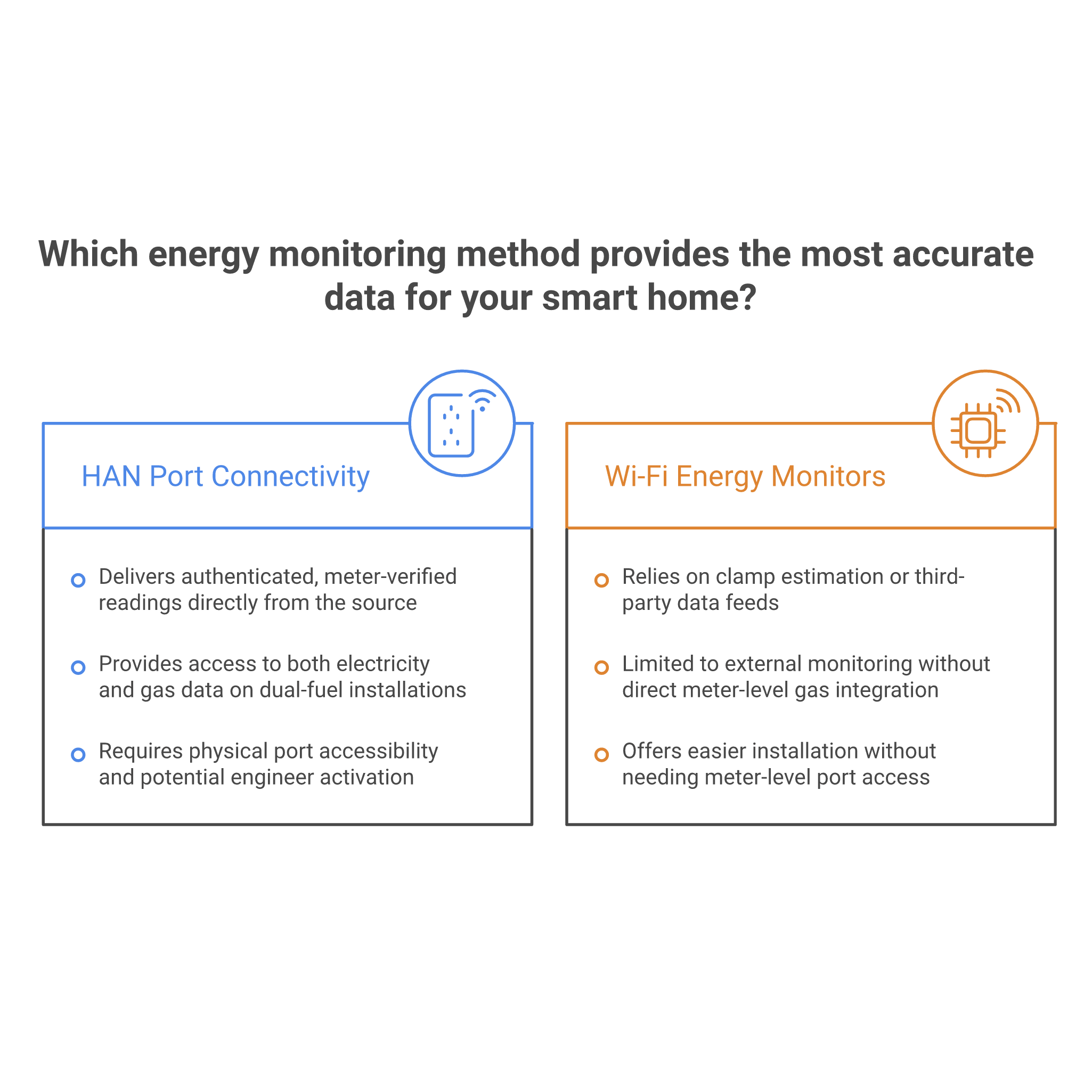
Every UK smart meter — including those installed under the Octopus Energy scheme — contains a Home Area Network (HAN) port, typically in the form of an RJ45 socket. This port functions as an authenticated data gateway, allowing compatible devices to receive direct, verified consumption data straight from the meter itself. This is a fundamentally different approach from Wi-Fi energy monitors that rely on clamp estimation or third-party data feeds, because the meter is communicating its own certified readings rather than having them approximated by an external sensor.
What HAN connectivity delivers over alternatives:
- Authenticated, meter-verified data — no estimation or inference
- Real-time readings with high precision, sourced directly from the meter
- Both electricity and gas data access on dual-fuel smart meter installations
- Direct integration into Z-Wave smart home ecosystems via a HAN interface device
Before purchasing a HAN interface device, it is worth confirming that your specific Octopus smart meter model exposes its HAN port and that the port is accessible within your meter cupboard. Some meters require an engineer visit to enable HAN connectivity. Checking this detail in advance avoids purchasing hardware that cannot be deployed immediately.
2. Powering Your Monitoring Device: USB Inputs vs. Meter-Powered Configurations
A practical consideration that is easy to overlook during purchase is how a dedicated HAN monitoring device receives its own power. Some HAN interface units are designed to draw power directly from the smart meter's RJ45 port — a neat, cable-free solution where the meter itself supplies the monitoring device. Others require an external 5V micro USB power supply, which introduces a short cable run but guarantees power supply stability regardless of meter model compatibility.
Choosing the right power configuration:
- Meter-powered: Cleaner installation, no external cables, but dependent on meter compatibility
- USB-powered: Works universally, guaranteed supply, suitable for all meter cupboard environments
- Check your meter cupboard for a nearby mains socket if USB power is required
For long-term reliability, a USB-powered configuration often provides more peace of mind, particularly in older properties where meter models may vary. Either way, the installation is non-invasive and does not require an electrician — making this one of the more straightforward upgrades available for improving your smart meter monitor for Octopus energy setups.
3. Whole-Home Clamp Metering: Measuring Real Electricity Consumption at the Source
For properties where HAN port access is unavailable, restricted, or simply not yet enabled, clamp-style current transformer (CT) metering offers a highly effective alternative. A CT clamp attaches non-invasively to a live mains cable — typically at the consumer unit or meter tails — and measures the current flowing through it without any cutting, splicing, or rewiring. This approach is safe, straightforward, and provides whole-home consumption data in watts and kilowatt-hours with impressive precision.
A clamp rated to 60A covers the vast majority of UK residential supplies comfortably, as most domestic properties operate well within this range under normal conditions. The data is then transmitted wirelessly via Z-Wave to your hub, where it can be displayed, logged, and used to trigger automations.
Ideal installation locations for CT clamps:
- Consumer unit (fuse board) — most common and accessible position
- Meter tails — cables running between the meter and consumer unit
- Individual circuit cables — for circuit-level breakdown where multiple clamps are used
4. Measurement Accuracy: Why Precision Percentages Define the Quality of Your Energy Data
Accuracy ratings are one of the most important specifications to scrutinise when selecting any energy monitoring device, yet they are frequently overlooked in favour of feature lists or price points. An accuracy figure — typically expressed as a percentage tolerance — tells you how closely a device's reported reading matches the actual value. A high-quality clamp meter operating at 99% accuracy is meaningfully different from a basic monitoring plug offering only 90% precision.
Why accuracy matters over time:
- Small inaccuracies compound across weeks and months of continuous logging
- Poor precision undermines billing comparisons and ROI calculations
- High-accuracy data supports confident appliance replacement decisions
- Reliable readings make automation thresholds function as intended
When evaluating a device's datasheet, look for accuracy specifications under real-world load conditions rather than idealised laboratory figures. For anyone using their smart meter monitor for Octopus energy cost analysis, high measurement accuracy is not a luxury — it is a prerequisite for trustworthy data.
5. Wireless Protocol Performance: Z-Wave Range, Frequency, and Mesh Networking for Energy Devices
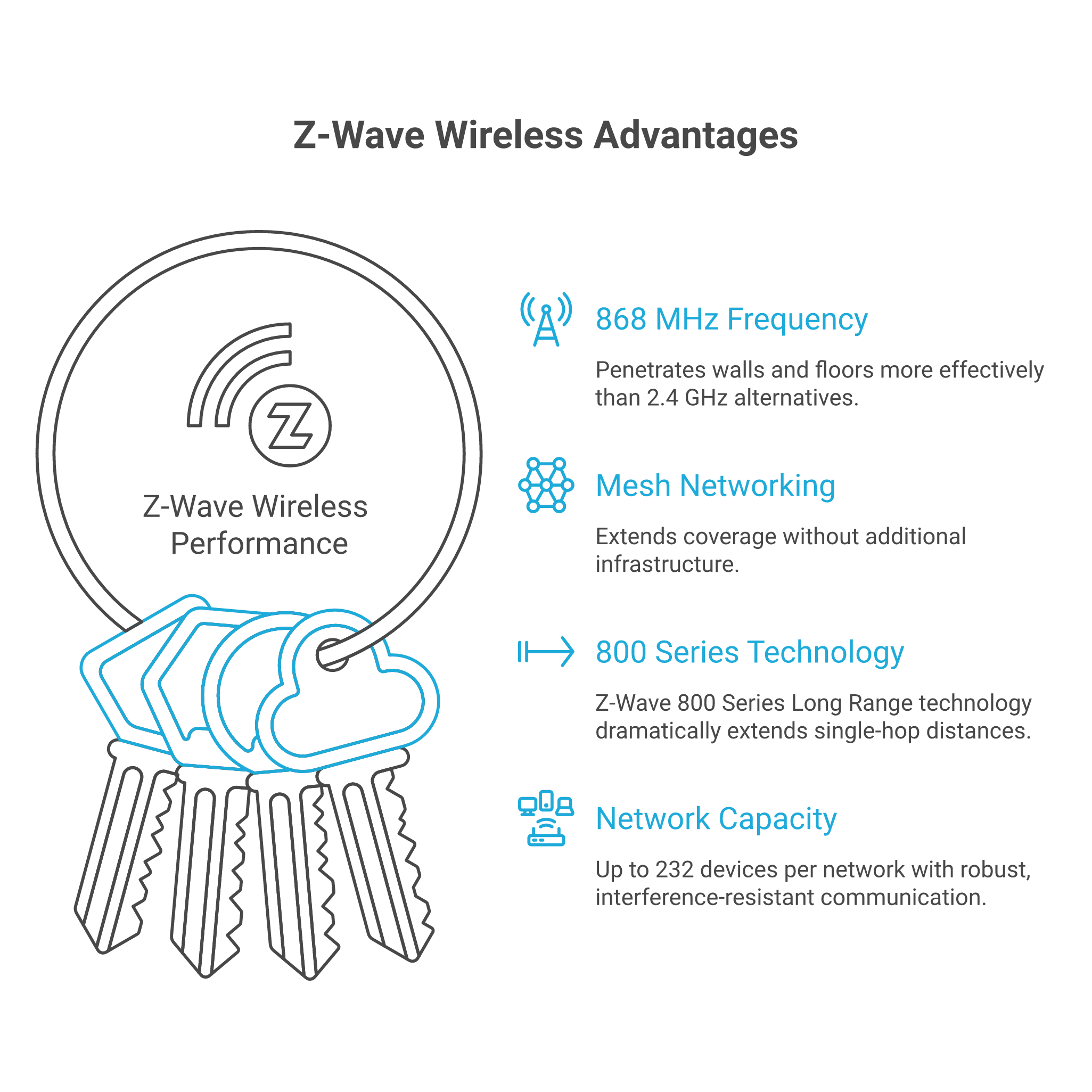
Energy monitoring devices are often installed in challenging locations — meter cupboards tucked under stairs, utility rooms at the far end of a property, or external meter boxes set into exterior walls. The wireless performance of these devices therefore matters enormously. Z-Wave operates on the 868 MHz frequency band in Europe, a lower frequency than Wi-Fi or Zigbee, which gives it superior wall and floor penetration and solid real-world transmission distances even in stone or brick-built UK homes.
One of Z-Wave's most practical advantages is its mesh networking architecture. Each mains-powered Z-Wave device in the home acts as a relay node, passing data between neighbouring devices and the hub. This means a monitoring plug or clamp meter in a distant cupboard does not need to connect directly to the hub — it routes through other Z-Wave devices instead.
Key Z-Wave wireless advantages for energy monitoring:
- 868 MHz frequency penetrates walls and floors more effectively than 2.4 GHz alternatives
- Mesh networking extends coverage without additional infrastructure
- Z-Wave 800 Series Long Range technology dramatically extends single-hop distances
- Up to 232 devices per network with robust, interference-resistant communication
6. Z-Wave Hub Compatibility and Smart Home Integration for Energy Monitoring
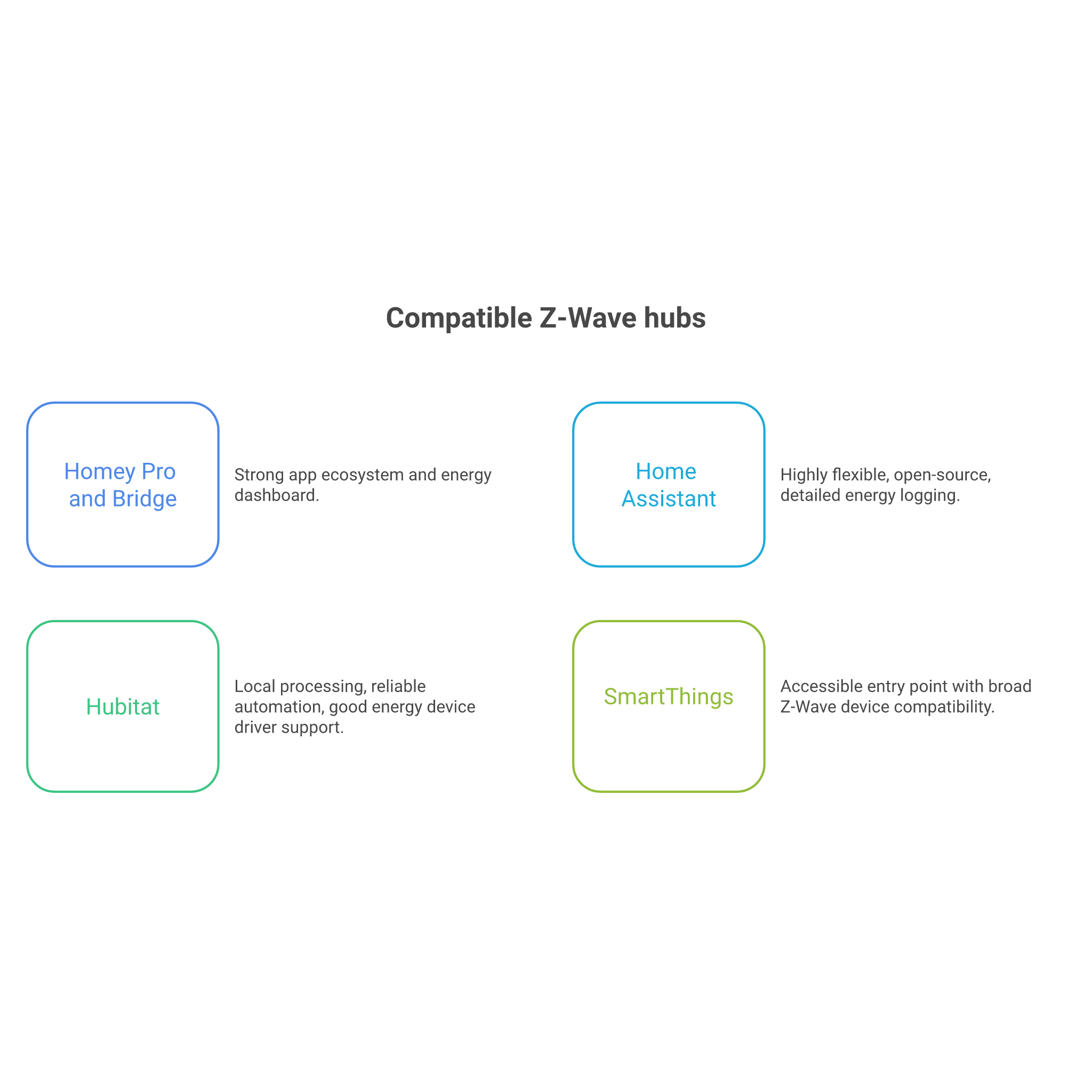
No Z-Wave energy monitoring device functions in isolation — every one requires a compatible Z-Wave hub or gateway to join a smart home ecosystem. For UK buyers, several well-supported hub options are available, each with varying levels of energy monitoring driver support and reporting capability. Selecting the right hub is as important as selecting the right monitoring hardware, as the hub determines how data is displayed, logged, and acted upon.
Compatible Z-Wave hubs commonly used in the UK:
- Homey Pro and Homey Bridge — strong app ecosystem and energy dashboard
- Home Assistant with Z-Wave JS UI — highly flexible, open-source, detailed energy logging
- Hubitat — local processing, reliable automation, good energy device driver support
- SmartThings — accessible entry point with broad Z-Wave device compatibility
Z-Wave's certified interoperability standard — covering more than 4,000 devices globally — means that hardware purchased today remains compatible with future hub upgrades and ecosystem changes. This long-term flexibility is particularly valuable when building out a layered energy monitoring strategy that may evolve alongside your Octopus smart meter setup.
7. Appliance-Level Monitoring: Using Smart Plugs to Track Individual Device Consumption
Whole-home data tells you how much electricity your household is consuming in total, but it does not tell you which appliances are responsible. That granularity requires appliance-level monitoring — and Z-Wave smart monitoring plugs are the most practical tool for achieving it. By plugging a monitoring-capable smart plug between a wall socket and an appliance, you gain real-time wattage readings, cumulative kilowatt-hour tracking, voltage, and current data for that individual device.
High-value appliances to monitor first:
- Washing machines and tumble dryers — high-draw, cycle-based appliances
- Electric heaters and oil-filled radiators — often significant hidden costs
- Gaming consoles and home office equipment — frequent all-day usage
- Always-on appliances — fridges, freezers, and set-top boxes consuming standby power
When selecting a monitoring plug, check its load capacity rating. A plug rated to 13A handles virtually all standard UK domestic appliances, but always verify that the intended appliance falls within the plug's rated wattage to ensure safe operation. Matching hardware to use case is as important as any software feature. Browse the smart plug and switch collection to compare load ratings and monitoring capabilities across the full range.
8. Data Displays, LED Indicators, and User Feedback Mechanisms
How an energy monitoring device communicates data back to its users varies significantly between products — and those differences have a real impact on how engaged household members stay with their energy data. App dashboards and hub-based reporting interfaces provide detailed historical analysis, but they require a deliberate action to check. Local visual feedback mechanisms — such as colour-changing LED rings that shift hue based on current load — provide instant, at-a-glance awareness without unlocking a phone.
Common feedback mechanisms across monitoring devices:
- RGB LED power rings — colour changes under increasing load levels
- Configurable indicator LEDs — signal on/off state and consumption mode
- Hub dashboards — historical graphs, energy totals, and cost estimates
- Push notifications — threshold alerts sent to mobile devices
For households with multiple occupants or less technically engaged family members, local visual cues offer a genuine advantage. A glowing ring that shifts from green to amber to red as a device draws more current communicates energy load intuitively — making the octopus energy smart meter display concept accessible beyond just those who actively manage the app.
9. Security, Encryption, and Data Privacy in Smart Energy Monitoring
Energy consumption data is more sensitive than it might initially appear. Usage patterns reveal when a property is occupied, when occupants wake and sleep, and which appliances are in regular use — information that warrants the same protection as any other personal data. Z-Wave's S2 security framework addresses this with AES-128 encryption applied to all device communications, ensuring that data passing between monitoring hardware and the hub cannot be intercepted or manipulated.
SmartStart, Z-Wave's QR code-based pairing system, improves on legacy inclusion methods by authenticating a device's identity before it joins the network — preventing rogue devices from impersonating legitimate hardware during setup. This matters especially in multi-unit properties or shared buildings where wireless signals may overlap with neighbouring networks.
Security features to look for in energy monitoring devices:
- Z-Wave S2 security with AES-128 encryption as standard
- SmartStart QR code pairing for authenticated onboarding
- Tamper detection on physical device enclosures
- OTA (over-the-air) firmware updates for ongoing security patching
10. Advanced Energy Automation: Turning Monitoring Data into Smart Actions
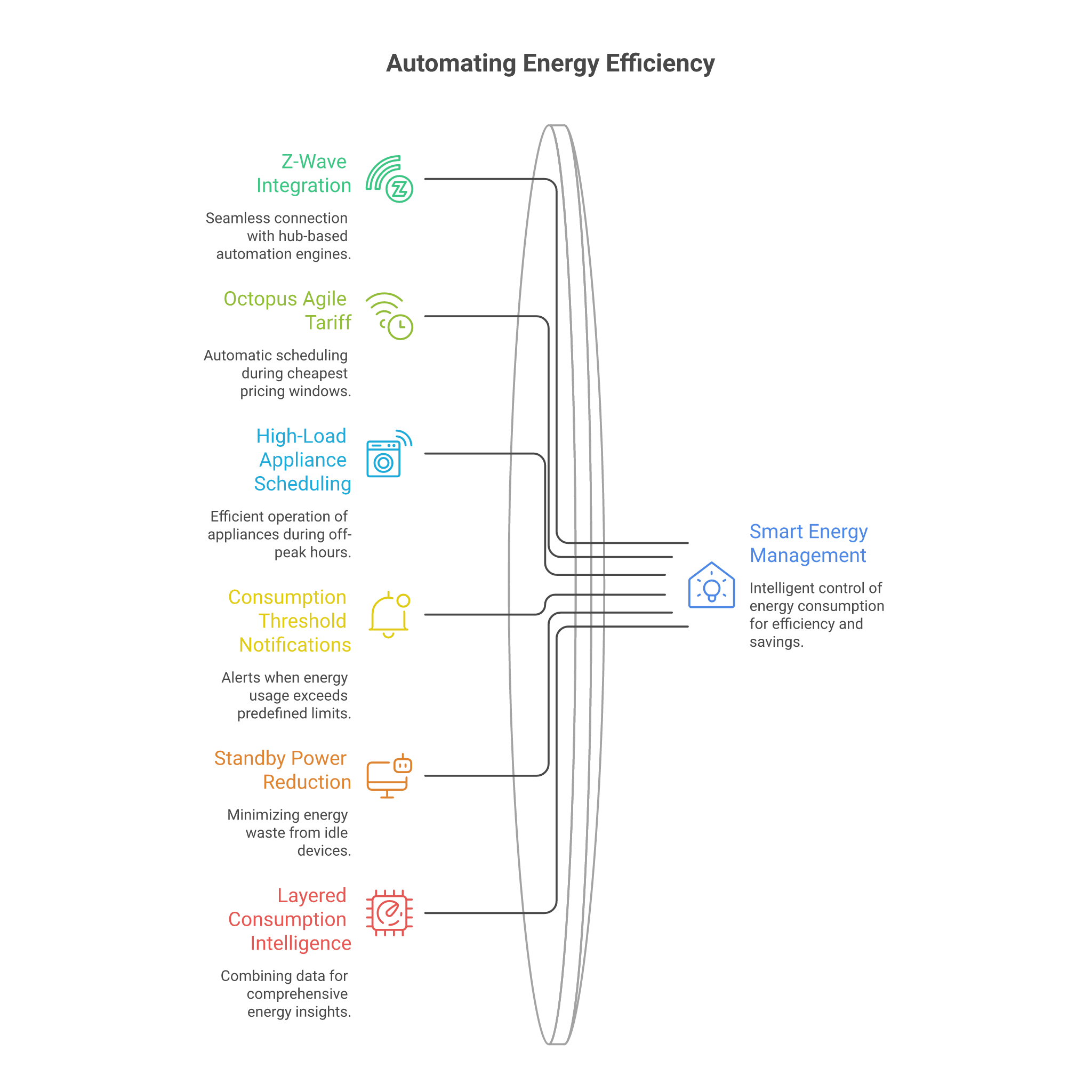
The real payoff of a well-configured energy monitoring setup comes when passive data collection gives way to active automation. Z-Wave energy devices integrate directly with hub-based automation engines, enabling rules that respond intelligently to consumption data in real time. For Octopus Agile tariff users, this opens up particularly compelling opportunities — scheduling high-draw appliances like washing machines and dishwashers to run during the cheapest pricing windows automatically, without any manual intervention.
Practical automation scenarios to consider:
- Schedule high-load appliances during Octopus Agile off-peak windows
- Trigger notifications when whole-home consumption exceeds a defined threshold
- Cut standby power to entertainment systems after a set idle period
- Combine clamp meter and plug-level data for layered consumption intelligence
Configurable power failure states on smart monitoring plugs are a further reliability feature worth noting — allowing users to define whether a plug restores to its previous on/off state or defaults to a safe position following a power cut. For fridges and freezers, this is not a trivial detail. OTA firmware updates ensure that as automation standards and hub integrations evolve, your monitoring hardware evolves with them — protecting the long-term value of your investment.
Our Recommended Energy Monitoring Devices for Octopus Smart Meter Visibility
After exploring the 10 key features and considerations that define a capable energy monitoring setup, the following devices represent the strongest options currently available at Vesternet for expanding your Octopus smart meter visibility. Each has been selected based on its specific monitoring capability, Z-Wave compatibility, and the distinct role it plays within a layered home energy strategy.
Best for Direct Smart Meter HAN Integration — Heatit Z-HAN2
For readers who want the most accurate, authenticated data feed direct from their Octopus smart meter's HAN port, the Heatit Z-HAN2 is the dedicated solution. This Z-Wave HAN sensor connects via its RJ45 port to compatible smart meters and brings the meter's own certified data directly into a Z-Wave hub — no estimation, no inference. It supports both meter-powered operation for compatible meters and external 5V micro USB supply for universal deployment. If a genuine, authenticated smart meter monitor for Octopus energy setups is the goal, this is the cleanest route to achieving it.
Best for Whole-Home Clamp Metering — Aeotec Home Energy Meter Gen5 (One Clamp, 60A)
Where HAN port access is unavailable or where an independent layer of whole-home measurement is preferred, the Aeotec Home Energy Meter Gen5 delivers professional-grade monitoring. Its 60A current transformer clamp installs non-invasively on mains cabling, reports usage in real time at 99% accuracy, and transmits data wirelessly using Z-Wave Plus over substantial distances — making it well suited to meter cupboards, utility rooms, and external installations. AES-128 encrypted data transmission and Z-Wave Gen5 mesh networking place it firmly in the premium category for whole-home consumption tracking, with long-term value that justifies its position at the upper end of the price range.
Best Budget-Friendly Smart Monitoring Plug — Vesternet Z-Wave Plug
For readers starting their appliance-level monitoring journey, the Vesternet Z-Wave Plug is the most accessible entry point in the range. It provides real-time power, energy, voltage, and current metering for any connected appliance, includes configurable LED feedback, and features a configurable power failure state — an important safety detail for fridges and freezers. Native integration with Hubitat, Home Assistant via Z-Wave JS UI, and SmartThings is supported through Vesternet's own drivers, making setup straightforward regardless of hub. Z-Wave Plus S2 security is included as standard, ensuring data privacy without additional configuration.
Best Long-Range Smart Monitoring Plug — Shelly Z-Wave Long Range Smart Plug UK
For properties with extended layouts, challenging wall penetration, or monitoring equipment in outlying locations, the Shelly Z-Wave Long Range Smart Plug brings Z-Wave 800 Series Long Range technology to a compact UK Type-G form factor. It supports loads up to 13A and delivers real-time energy monitoring at up to 1% accuracy — matching the precision of dedicated clamp meters. It also functions as a Z-Wave mesh repeater, strengthening overall network coverage while monitoring the connected appliance. SmartStart and S2 Authenticated Security are included, with OTA firmware updates ensuring compatibility with evolving hub ecosystems. For users prioritising network reach and future-proof 800 Series technology, this sits at an excellent mid-range price point.
Best Premium Design Smart Monitoring Plug — Fibaro Wall Plug Gen5 (UK)
For readers who want the most feature-rich, visually distinctive, and precision-engineered smart monitoring plug available, the Fibaro Wall Plug Gen5 sets the benchmark. Its crystal RGB LED power ring provides instant, colour-coded load feedback without any app interaction required — making it one of the most effective octopus energy smart meter display supplements available for non-technical household members. A built-in temperature sensor adds a further safety layer, alerting users if a connected device exceeds safe operating temperatures. Child safety socket covers, wireless OTA firmware updates, and straightforward Z-Wave inclusion make it ideal for living spaces where both aesthetics and monitoring sophistication are priorities. It sits at the higher end of the smart plug price range and is particularly well suited to advanced Z-Wave ecosystem users seeking a premium finish.
Conclusion
Building a genuinely useful picture of your household's electricity consumption requires more than simply having an Octopus smart meter installed. As this guide has demonstrated, the right combination of dedicated monitoring hardware — whether a HAN interface device for authenticated meter data, a precision clamp meter for whole-home measurement, or intelligent smart plugs for appliance-level granularity — can transform raw usage figures into actionable intelligence. The key factors to carry forward are protocol reliability through Z-Wave's mesh architecture and S2 security, measurement accuracy, hub compatibility, and a layered approach that combines device types to cover both whole-home and appliance-specific monitoring.
The most effective next step is to audit your current setup before purchasing anything. Check whether your Octopus smart meter has an accessible HAN port, assess your Z-Wave hub ecosystem or consider setting one up, and identify the two or three appliances most likely to be costing you the most. Starting with a single high-consumption device monitored via a smart plug, then layering in clamp or HAN-based whole-home data, is far more sustainable than attempting to instrument every socket simultaneously — and the data gathered in the first week will guide your next purchase decision far more intelligently than any specification sheet.
Vesternet stocks a curated range of Z-Wave energy monitoring devices suited to every stage of this journey — from starter monitoring plugs through to professional-grade clamp meters and HAN interface hardware. Browse the Vesternet Energy Monitoring collection and Smart Plug and Switch collection to explore the full range, compare specifications, and find the right fit for your Octopus smart meter setup. If you are unsure which device best suits your meter type, hub, or property layout, Vesternet's expert team is on hand to help — just get in touch and we will point you in the right direction.