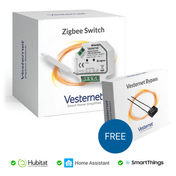
The VES-ZB-SWI-015 is a Zigbee 2 Channel Switch and offers the following features:
- 3-Wire (with Neutral) wiring
- 2 Output Channels
- 2 Switch Input Channels
- Supports Momentary Switches
- 5.1A Resistive Load (1.7A Capacitive / Inductive Load) per channel
- Power, Energy, Voltage & Current Metering (whole device only)
- Small Installation Size 45.5 x 45 x 20.3 mm
- Zigbee 3.0 works with Zigbee ZHA & Zigbee ZLL Hubs & Bridges
A manual for this device can be downloaded here.
Vesternet Zigbee Device Drivers
These can be downloaded from here.
Two files are required for this particular Device:
- VES-ZB-SWI-015 2 Channel Switch.groovy
- VES-ZB-SWI-015 2 Channel Switch Child Switch.groovy
Please report any issues with the Vesternet Zigbee Device Drivers by submitting a technical request ticket.
This Vesternet Zigbee Device has the following features when used with our supporting Device Driver in the Hubitat Smart Home Controller.
- Supports On and Off Control of each channelfrom the Web UI.
- Reports On and Off Events for each channel when operated from the local switches.
- Reports Power, Energy, Current and Voltage Meters for the whole device.
- Can be used as a "Trigger" for On and Off Events for each channel in built-in Apps such as Basic Rule, Simple Automation Rules and Rule Machine.
- Can be used as a "Trigger" for Meter Events for the whole device in built-in Apps such as Basic Rule, Simple Automation Rules and Rule Machine.
- Can be used as an "Action" for On and Off Control of each channel in built-in Apps such as Basic Rule, Simple Automation Rules and Rule Machine.
- Has configuration options for Meter reporting.